
CapCut Text to Speech Alternative: Better AI Voices (2026)
CapCut's built-in text to speech is genuinely useful: type a line, pick a voice, and you have narration without recording a word. For quick TikToks and Reels, it gets the job done.
But creators who publish regularly keep running into the same walls: a short list of languages (CapCut's own site lists around 13 supported languages for TTS), voice availability that varies by region and version, and audio that lives inside your project — there's no clean way to export a voiceover as a standalone MP3 to reuse, mix, or sell.
This guide covers where CapCut's TTS actually falls short, what a real alternative looks like, and the exact workflow for getting studio-quality AI voiceovers into your CapCut timeline in minutes.
Short on time? SynVoice gives you 38,000+ premium AI voices across 100+ languages, downloadable as MP3 — generate, import into CapCut, done. Try the live demo free.

What CapCut's Text to Speech Does Well
Fair is fair — CapCut's TTS has real strengths:
- It's built in. No extra app, no tab-switching. Type text on the timeline, generate, and the voice clip lands in your project.
- It's fast. Generation takes seconds — ideal for short-form content with quick turnarounds.
- It has personality voices. Tones like "Chill Girl" or "Confident Male" are tuned for social content.
- It's free. The TTS feature itself doesn't cost extra, which is why so many creators start there.
For a 30-second meme or a quick product clip, that's enough.
Where CapCut's TTS Holds You Back
1. Limited language and voice coverage
CapCut's TTS supports roughly a dozen languages, and the voice list you see depends on your app version and region. If you create content in Hindi, Urdu, Bengali, Punjabi, or Arabic, your options are thin — often a handful of generic voices with limited emotional range. Compare that with a dedicated voice studio: SynVoice offers 38,000+ premium AI voices across 100+ languages, including Urdu, Hindi, Arabic, Punjabi, and Bengali, with real voice variety instead of one token voice per language.
2. No clean MP3 export
This is the big one. CapCut generates the voiceover inside your project. There's no "export this voiceover as MP3" button. Creators who want the audio for a podcast episode, an audiobook chapter, a client deliverable, or just to reuse it across videos have to resort to workarounds — exporting a video and stripping the audio, or re-recording it. A dedicated TTS tool gives you a downloadable audio file from the start.
3. Voices built for trends, not narration
CapCut's voice catalog leans heavily toward punchy, entertainment-style voices. That's great for memes. It's less great for a 10-minute YouTube documentary, a course lesson, or an ad that needs a warm, trustworthy narrator. Documentary pacing, dramatic pauses, and consistent character voices across a series are things a dedicated voice studio is built for.
4. No voice cloning
Your channel's voice is your brand. CapCut can't recreate your voice from a sample — so every video sounds like one of the same stock voices thousands of other creators use. Voice cloning lets you generate narration in your own voice (or a licensed brand voice) from a short sample, so your content stays recognizably yours.
5. Locked inside the editor
CapCut's TTS is a feature of an editor, not a standalone voice tool. You can't generate voiceovers in bulk, use them outside CapCut, or call them from an app via API if you automate your content pipeline.
CapCut TTS vs a Dedicated AI Voice Studio
| CapCut built-in TTS | SynVoice (dedicated TTS) | |
|---|---|---|
| Languages | ~13, region-dependent | 100+ languages |
| Voice library | Dozens of preset voices | 38,000+ premium AI voices |
| Hindi/Urdu/Arabic voices | Limited selection | Full voice libraries incl. Urdu, Hindi, Arabic, Punjabi, Bengali |
| MP3 export | No standalone export | Direct MP3 download |
| Voice cloning | Not available | Yes — clone your own voice |
| Use outside video editor | Locked to projects | Reuse anywhere: podcast, ads, courses |
| API access | No | REST API available |
| Price | Free (in-app) | Free live demo; 1M welcome credits free, plans from $3.99 |
The takeaway: CapCut wins on convenience for in-app quick clips. A dedicated studio wins on quality, language coverage, and flexibility for everything else.
The Workflow: Studio-Quality Voiceovers in CapCut (5 Steps)
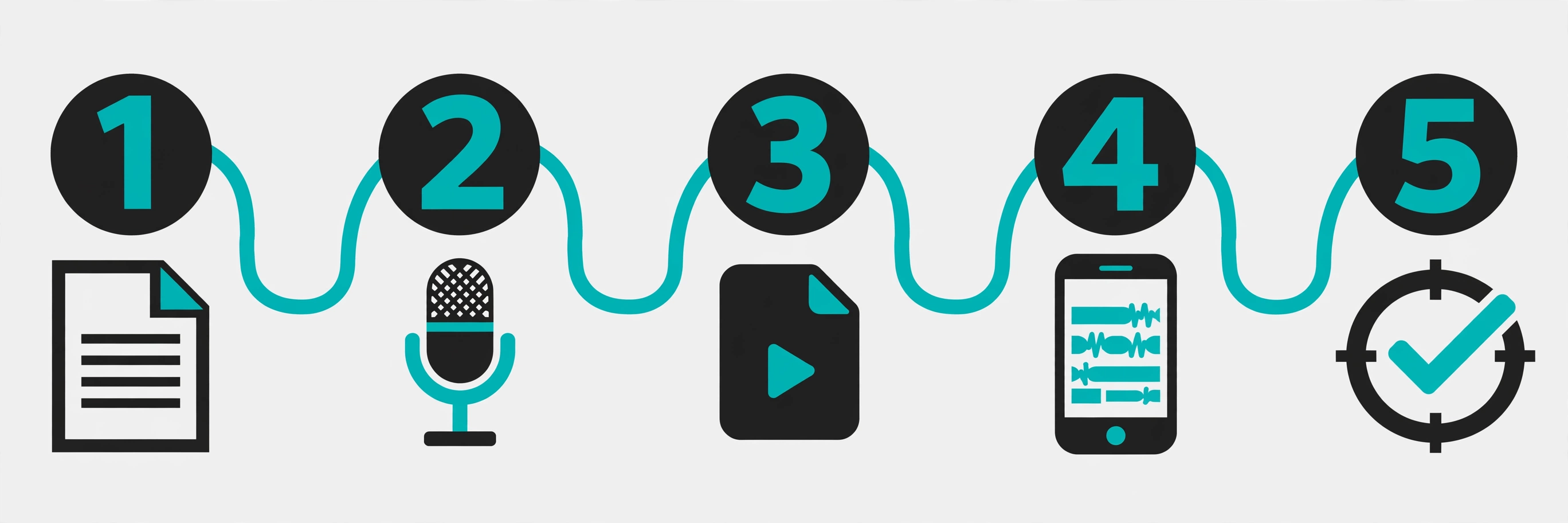
You don't have to choose one or the other. The best creators use both: generate the voiceover in a proper TTS studio, then drop the MP3 into CapCut's timeline.
Step 1 — Write your script. Draft your narration in any text editor. Keep sentences short for social video; punchy lines work best. For scripting tips, see our guide to AI voiceover for faceless YouTube.
Step 2 — Generate the voiceover in SynVoice. Paste your script into SynVoice, browse the voice library, and pick a voice that fits your content — dramatic for storytelling, warm for tutorials, energetic for Reels. Preview it in the live demo before you commit.
Step 3 — Download the MP3. Export your finished voiceover as an MP3 file. Unlike CapCut's in-project audio, this file is yours: reuse it, remix it, or deliver it to a client.
Step 4 — Import into CapCut. In your CapCut project, go to Audio → import the MP3. Drag it onto the timeline and sync it with your visuals. You can still use CapCut's auto-captions on top of it for accessibility and watch time.
Step 5 — Mix and export. Balance the voiceover against music and sound effects with CapCut's audio tools, then export your video as usual. The voiceover quality will be noticeably cleaner than in-app TTS — especially on longer narration.
Which Voices Work Best for CapCut Content?
Faceless YouTube / storytelling: A deep, steady narrator voice with dramatic pacing. See how top channels do it in our faceless YouTube voiceover guide — and how they monetize AI voiceover content.
TikTok / Reels / Shorts: Energetic, youthful voices with fast pacing. Generate the voiceover first, then cut your visuals to the audio — editing to a finished voiceover is faster than the reverse.
Urdu and Hindi content: If CapCut's regional voices sound off to you, try dedicated Urdu or Hindi voices instead. Our Urdu text to speech guide and Hindi AI voiceover for CapCut guide break down which voices sound natural and why.
Ads and client work: A warm, confident voice — and if it's recurring client work, clone the brand voice once and reuse it forever.
What Does a Better Alternative Cost?
CapCut's TTS is free, so any alternative has to earn its place. Here's the honest math on SynVoice:
- Free to try: the live demo on synvoice.io needs no signup.
- 1 million welcome credits, free: every new signup gets 1 million free credits — and unlike most free tiers, these never expire. No weekly reset, no use-it-or-lose-it.
- Paid plans from $3.99: when you need more, paid plan credits are valid for 30 days. See the full breakdown on the pricing page.
If you're producing a few videos a week, the free welcome credits alone can carry you for a long time. And if you're coming from a tool with a weekly character cap that resets, the never-expiring credits are the difference that matters.
Frequently Asked Questions
Can I use CapCut's text to speech for YouTube videos?
Yes — CapCut's TTS works for YouTube videos you edit in CapCut. The limitation isn't permission, it's quality and flexibility: limited language options, no standalone MP3 export, and no voice cloning. Many creators generate narration in a dedicated TTS tool and import the MP3 into CapCut for the best of both worlds.
How do I get better Hindi or Urdu voices than CapCut's?
CapCut's regional voice selection is limited and varies by version. Dedicated AI voice studios like SynVoice maintain full voice libraries for Hindi, Urdu, Arabic, Punjabi, and Bengali with dozens of voices each. Generate the voiceover there, download the MP3, and import it into your CapCut timeline.
Can I export CapCut text to speech as MP3?
Not directly — CapCut has no standalone audio export for TTS clips; the audio lives inside your project. The common workaround is exporting the video and stripping the audio, which costs quality. Generating the voiceover in a dedicated TTS tool gives you a clean MP3 from the start.
Is there a free CapCut text to speech alternative?
Yes. SynVoice's live demo is free with no signup, and new signups get 1 million welcome credits that never expire — enough for a large amount of voiceover generation before you'd need a paid plan (from $3.99).
Will AI voiceovers hurt my YouTube monetization?
Not by themselves. YouTube monetizes AI-narrated content that adds original value — original scripts, editing, and commentary. What gets rejected is low-effort, repetitive content. Our monetization guide covers the rules in detail.
CapCut's text to speech is the fastest way to narrate a quick clip — but when your content outgrows it, you don't have to abandon CapCut. Generate studio-quality voiceovers in SynVoice, drop the MP3 into your timeline, and keep editing where you're comfortable. Better voices, zero extra learning curve.